TUI Reference
Keyboard shortcuts and panel layout.
Layout
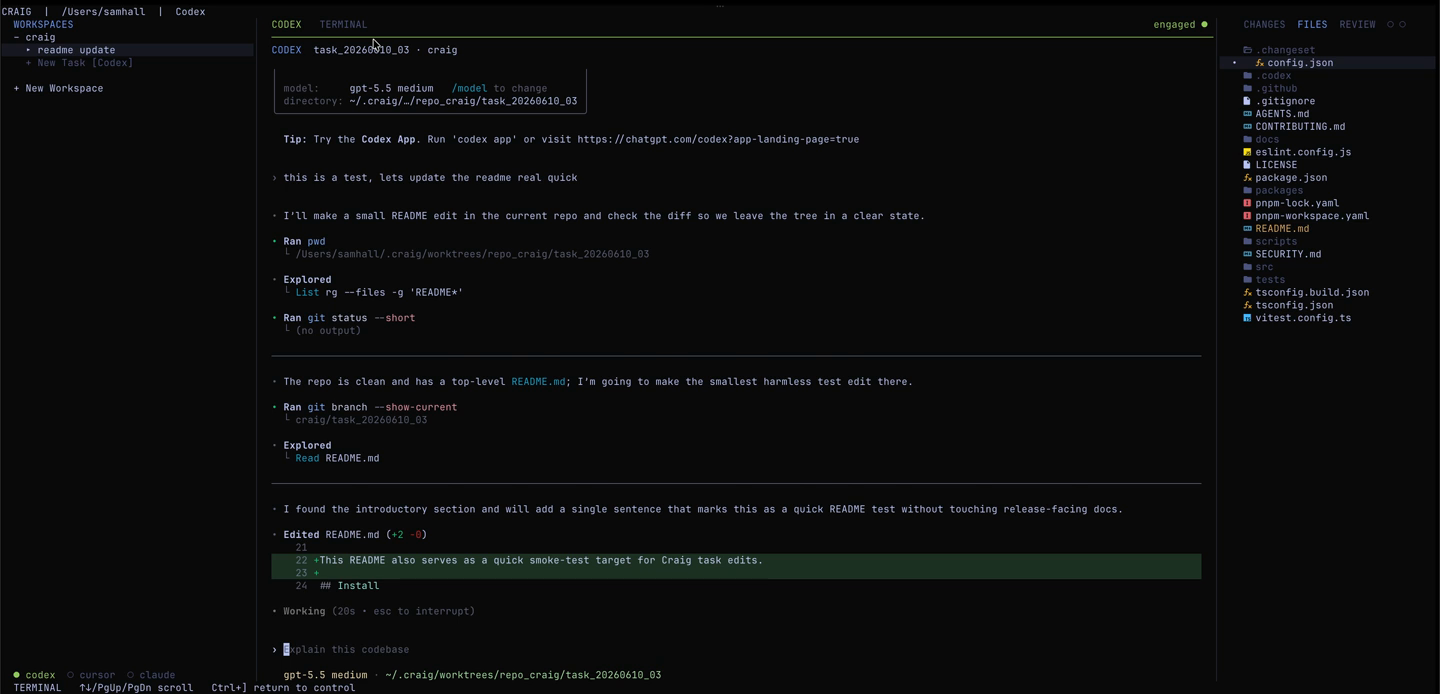
Craig's TUI has three zones: a left panel for repo and task navigation, a center area with tabbed agent and terminal views, and a right inspector with Files, Changes, and read-only Review modes.
Global shortcuts
| Key | Action |
|---|---|
| ? | Show help |
| Esc | Open pause menu |
| Tab / ] | Move focus forward |
| Shift+Tab / [ | Move focus backward |
| ↑↓ / j k | Move the focused selection |
| PgUp / PgDn / wheel | Scroll the focused inspection or terminal view |
| z | Zoom the center panel |
| n | Start a new task prompt |
| q | Quit |
Tasks panel (left)
| ↑↓ / j k | Navigate workspaces and tasks |
| Enter on + New Task | Open the task prompt |
| Enter on + New Workspace | Open the workspace browser |
| Enter on task | Attach the selected task PTY |
| r on + New Task | Cycle the runner for the next task |
| X on task | Close the selected task |
| X on workspace | Remove the selected workspace |
Center panel
| ← → / h l | Switch tabs |
| + | Create the preferred tab kind |
| a | Agent tab |
| t | Terminal tab |
| r | Cycle the runner for the next agent tab |
| x | Close tab |
| Enter | Attach PTY |
Inspector panel (right)
| ↑↓ / j k | Navigate |
| ← → / h l | Switch mode (Files / Changes / Review) |
| Enter in Files | Open the selected file or collapse/expand a directory |
| Enter in Changes | Open the selected diff |
| Enter in Review | Refresh status or close the task, depending on selected action |
| R in Review | Refresh read-only PR/check state |
| X in Review | Close the task record |
Terminal mode
| Ctrl+] | Return to control mode |
| ↑↓ / PgUp / PgDn / wheel | Scroll terminal history |
Task prompt
While entering a new task, Ctrl+R cycles runners, Enter creates the task, and Esc cancels. The entered text becomes Craig task metadata; it is not sent to the agent PTY.
Workspace browser
The workspace browser uses ↑↓ or j k to move, → or l to open a directory, ← or h to go up, Enter to add the selected path, and Esc to cancel.
Review mode
Review mode is read-only — check PR state, CI status, and comments here. Run checks, commit, push, or merge from the agent PTY.
Pause menu
Press Esc from control mode to pause. Agents keep running.